Kubernetes Architecture and Installation (K8S)

In 2014 Google developed one application or tool called Kubernetes and later on, donated to CNCF (Cloud Native Computing Foundation).
Where Cloud Native Means they will work on Kubernetes for better performance, design and build to exploit the scale, elasticity and flexibility the cloud provides.
Kubernetes is also named K8S. What is K8S?
In between Kubernetes words, there are 8 alphabetical words. So basically K8S is a short form of Kubernetes.
What is Kubernetes?
Kubernetes is an orchestration tool from which we can manage our containers.
It is designed to automate the deployment, scaling, and management of containerized applications. Kubernetes can be used to manage and run applications in a variety of environments, including public, private, and hybrid clouds. Kubernetes provides a rich set of features that help manage the complexity of deploying and managing containerized applications at scale.
Kubernetes Architecture
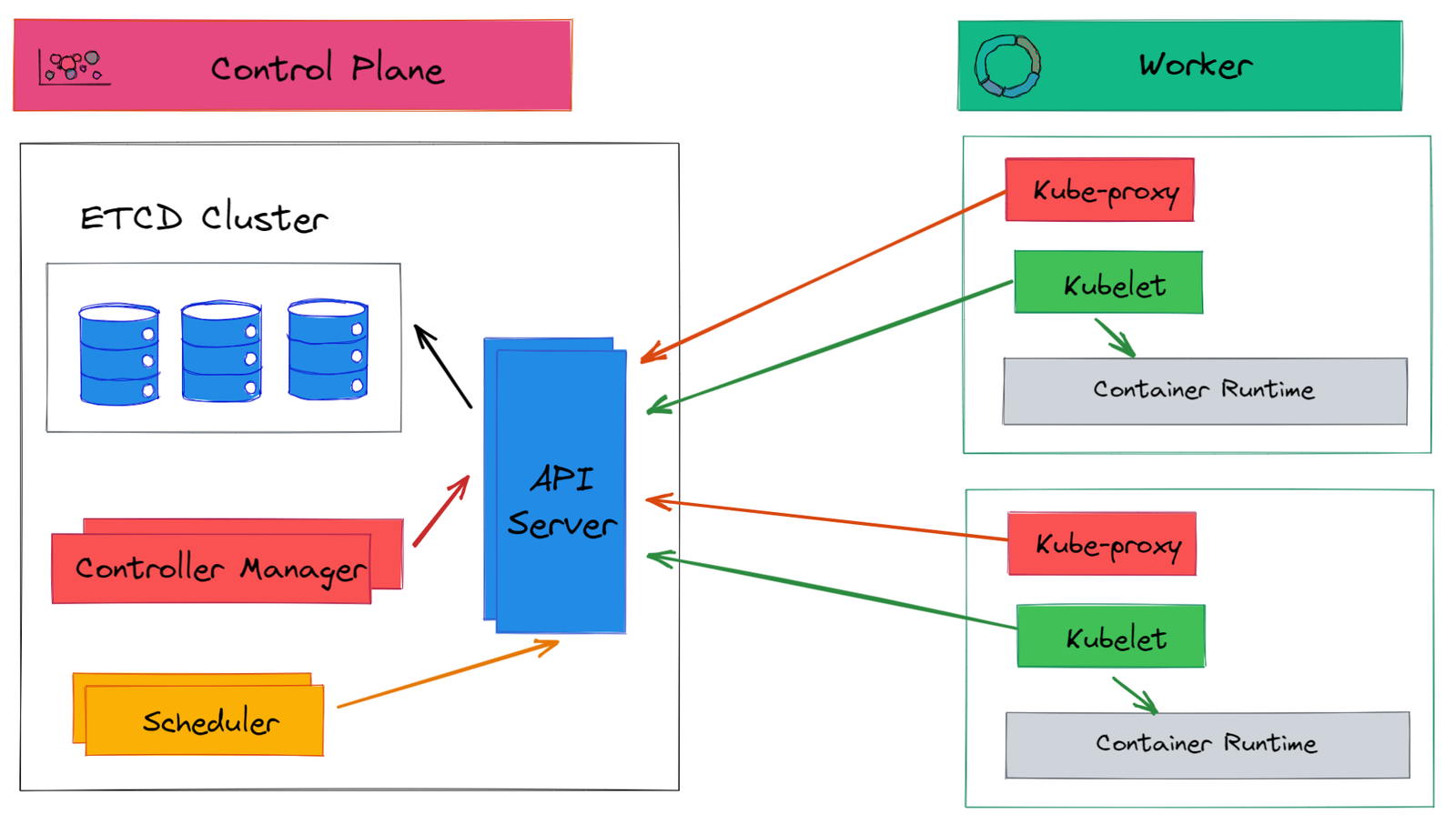
As shown in the above diagram the Kubernetes architecture consists of two major components_ (1) Control Plane or Master Node
(2) Worker Node
In Master Node or the Control plane, there are four major components_
1. Kube API Server
2. Controller Manager
3. Kube-Scheduler
4. ETCD
In Worker Node, there are four major components_
1. Kubelet
2. Kube-Proxy
3. Container Engine
4. POD
Master Node Components:-
**Kube API Server**
Kube API Server is the primary management point for the Kubernetes cluster and it is responsible for validating and processing API requests.
The user writes his requirement in the manifest file or YAML file and this file directly interacts with Kube API Server.
**Controller Manager**
The controller manager is responsible for managing every activity which is performed in Kubernetes architecture.
The Kube-Controller Manager is responsible for running controllers that are responsible for maintaining the desired state of the Kubernetes cluster. The controllers include the node controller, the replication controller, and the endpoint controller.
**ETCD**
Basically, Etcd is a storage where all the information of every component is stored. etcd is a distributed key-value store that stores the configuration data of the Kubernetes cluster. It is used to store the state of the cluster, including the state of all objects (pods, services, deployments, etc.).
**Kube-Scheduler**
The Kube-Scheduler is responsible for scheduling the pods on the nodes in the Kubernetes cluster. It uses information about the nodes' available resources and the pod's resource requirements to determine the best node to schedule the pod on.
Worker Node Components:-
**Kubelet**
The Kubelet is the primary node agent that communicates with the Kubernetes API server and ensures that the containers are running on the node as expected. It is responsible for starting, stopping, and monitoring the containers on the node.
The kubelet performs several functions, including:
Fetching container manifests from the Kubernetes API server.
Ensuring that the containers described in the manifest are running and healthy.
Reporting the status of the containers back to the API server.
Mounting and unmounting volumes as necessary.
Executing container health checks.
**Kube-Proxy**
The kube-proxy is responsible for providing network connectivity to the pods running on the node. It does this by creating network rules that allow traffic to be forwarded to the pods.
**Container Engine**
The Container Runtime is the software that runs the containers on the node. Kubernetes supports several container runtimes, including Docker, CRI-O, and container d.
**POD**
Pods are the smallest deployable units in the Kubernetes cluster. They contain one or more containers and are scheduled on nodes.
Consist of one or more tightly coupled containers.
Pod runs on node, which controlled by master.
Kubernetes only knows about pods (doesn't know about individual containers).
Can not start a container without pod.
One pod usually contains one container.
How to create a Kubernetes cluster:-
1 Master Node and 1 Worker Node = Cluster
1 Master Node and Multiple Worker Node = Cluster
Multiple Master Node and Multiple Worker Node = Cluster
This is how we can create our Kubernetes cluster.
Cluster --> Node --> POD --> Container --> Application (microservices)
Kubernetes Minikube Installation
For the Control plane, we need at least 2 CPUs and 4GB RAM = t2.medium
and for the Worker Node, we can use 1 CPU and 1 GB RAM = t2.micro
--------------------------------------------------------------------------------------------------------------------------------------------------------------------------------
Please follow the steps to install Minikube __ ( You can run Cluster plane and worker node on a single instance )
Step 1:--> sudo su
Step 2:--> sudo apt update && apt -y install docker.io
Step 3:--> curl -LO https://storage.googleapis.com/kubern... -s https://storage.googleapis.com/kubern... && chmod +x ./kubectl && sudo mv ./kubectl /usr/local/bin/kubectl
Step 4:--> curl -Lo minikube https://storage.googleapis.com/miniku... && chmod +x minikube && sudo mv minikube /usr/local/bin/
Step 5:--> apt install conntrack
Step 6:--> minikube start --vm-driver=none
Step 7:--> minikube status
--------------------------------------------------------------------------------------------------------------------------------------------------------------------------------
If you want to install Kubeadm on your system please follow my GitHub profile where you find the step-by-step installation process of Kubeadm.
My Github Profile:- "https://github.com/nileshgan/Kubeadm-Installation"
